Categories
Blog Security

2025-09-11: Cyber Security Day at the Rheinforum Wesseling

Today, I participated as an IT consultant / IT service provider in the 38th Cyber Security Day at the Rheinforum in Wesseling.

Under the motto “Act now – understand cybersecurity and anchor it within your company”, the event offered many practical insights, particularly valuable for small and medium-sized enterprises (SMEs). 🛡️

The workshops and case studies of real cyber incidents were especially insightful. They highlighted the importance of having clear incident response plans:

👉 Who takes on which role in the event of an emergency?
👉 How is internal and external communication managed?
👉 And most importantly: How quickly can backups actually be restored?

Another key focus was on current threat scenarios – from phishing campaigns to ransomware and social engineering. It became very clear: attacks are becoming increasingly sophisticated, and any company can be affected. 🔐

Alongside the expert presentations, the opportunity to exchange ideas with other companies was a highlight. While many SMEs are already aware of the risks, documented processes and regularly tested plans are often still missing.

💡 My conclusion: With relatively little effort, SMEs can significantly strengthen their security – provided they take a structured approach, clearly define responsibilities, and practice regularly.

Through continuous professional development, I keep my expertise up to date in order to prepare companies for the latest threats and protect them sustainably. I am always available to support SMEs in building or optimizing their IT security strategies.

👉 How about your company – do you already have a clear incident response plan in place?

Feel free to share your thoughts in the comments below!

Categories
Blog Law Security

2025-09-10: EU Chat Control: Why This Plan is Dangerous Nonsense

The European Union is pushing forward with the so-called Chat Control – a measure that at first glance might look like a protective tool, but in reality massively threatens the fundamental rights of millions of EU citizens. What is being presented as a fight against child abuse is in fact a bureaucratic and technical monster that will do more harm than good.

What is Chat Control About? 💬

The EU Commission wants to force internet services to automatically scan all messages, photos and videos for illegal content. This doesn’t just affect public platforms, but also private chats and encrypted messengers like WhatsApp, Signal or Threema. That means every private conversation online could be monitored by default – an unprecedented intrusion into privacy.

Key dates:

  • On September 12, 2025, the next hearing of the EU Commission will take place.
  • On October 14, 2025, the final vote in the EU Council is scheduled.
Why Chat Control is Problematic ⚠️
  1. Mass surveillance of all citizens
    Instead of targeting criminals, everyone in the EU is put under general suspicion. Every WhatsApp message, every picture sent could be screened by algorithms. This is nothing less than digital mail control – and it undermines the principle of presumption of innocence.
  2. False alarms everywhere
    Algorithms are not perfect. Studies already show that automatic upload filters generate huge numbers of false positives – i.e., harmless content flagged as “suspicious.” Family beach photos 🏖️, innocent conversations, or artistic work could all end up being flagged. This not only causes mistrust but could also criminalize innocent people.
  3. The end of secure encryption 🔐
    To scan private chats, end-to-end encryption would have to be weakened or bypassed. But encryption is the backbone of secure digital communication – whether in journalism, business, or personal conversations. Breaking encryption opens the door wide to hackers, intelligence agencies and criminals.
  4. Potential abuse by authoritarian states
    A system like this is easily misused. Today it’s about detecting child abuse material, tomorrow it could be about political content or critical opinions. What starts in the EU could become a blueprint for censorship in countries with weaker democratic standards.
An Attack on Fundamental Rights 🛑

Chat Control turns the relationship between citizen and state upside down. Instead of protecting rights, it undermines them. It directly violates:

  • The right to privacy and confidential communication
  • The presumption of innocence
  • Freedom of expression
Conclusion: More Harm Than Good ❌

Child protection is undoubtedly an important goal – but Chat Control is the wrong way to achieve it. It weakens digital security for everyone, creates massive false alarms, and builds a surveillance tool that has no place in a democracy.

Instead of treating all citizens as suspects, resources should be focused on strengthening law enforcement, improving international cooperation, and consistently applying existing laws.

👉 Chat Control is not a shield, but a sword hanging over our freedom. And that’s exactly why this plan must be stopped.

More Information (Chaos Computer Club / Digitalcourage) is available here:
https://chat-kontrolle.eu/

Categories
Blog Cloud Security Server

2025-09-05: Microsoft Lock-In? Break Free – Build Your Own Cloud!

Let’s be honest: Do you really want to hand over your sensitive data blindly to a corporation like Microsoft?
I don’t. And that’s exactly why I keep advising my clients not to fall into the dependency trap of Microsoft Cloud.

🔒 Control Instead of Dependence

In Microsoft Cloud, it’s not you but Microsoft who decides what happens with your data, where it’s stored, and which features will still be available tomorrow. Once you’re locked into this ecosystem, it becomes very hard to get out.
That’s what I call vendor lock-in – and it’s not a technical feature, but an economic trap.

⚡ Your Own Cloud – Faster Than You Think

Many believe running their own cloud is complicated, expensive, and slow. The truth is just the opposite:

  • With modern open-source solutions, I can set up a high-performance cloud environment for you in no time.
  • A VPN server ensures secure access from anywhere.
  • Your own cloud server takes care of data storage – and you remain in full control.

The result: super fast, flexible, and free from artificial limitations.

🛠️ Multiple Paths to Success

There isn’t just one way to do it – there are several great options that can be tailored to your needs:

  • Nextcloud: One of the most popular open-source platforms for files, calendars, contacts, and more.
  • Synology DiskStation: Ready-to-use hardware solutions with built-in cloud software, easy to administer.

Whether you prefer maximum flexibility or a convenient turnkey package – both are possible, without falling into Microsoft’s grip.

💡 Why It’s Better
  • No license fees: Stop paying monthly for unused accounts.
  • Full data sovereignty: Your data stays where it belongs – with you.
  • Transparency: Open solutions, no black box.
  • Flexibility: Adapted to your business, not to a corporation’s rules.
🚀 My Offer to You

As an IT service provider, I specialize in freeing companies from the Microsoft Cloud straitjacket and setting up powerful alternatives.
You don’t need to understand the hardware or software in detail – I take care of the setup, security, and operation.

👉 The result: Your own cloud. Independent, fast, and secure.

Categories
Blog Bitcoin Future Security

2025-09-02: Bitcoin vs. Big Tech: Who Has More Computing Power?

When most people think of Bitcoin, they picture digital money, speculation, or blockchain technology. But there’s another aspect that often gets overlooked: the massive computing power that keeps the Bitcoin network running. By now, this power even surpasses the capacities of the largest technology companies in the world.

⚙️ What Does “Computing Power” Mean in the Bitcoin Network?

Behind the scenes of the Bitcoin system, millions of specialized computers – called “miners” – are working nonstop. They continuously solve small mathematical puzzles. By doing this, they secure the Bitcoin blockchain and make sure no one can fake or manipulate transactions.

The speed at which these tasks are solved is called the hashrate. Think of it like the RPM of a huge engine: the faster it runs, the more work gets done.

📈 The Current State – A Superlative

In September 2025, the Bitcoin network reaches over 1005 exahashes per second. That’s a number almost beyond imagination. To put it into perspective:

  • 🔢 The network performs trillions upon trillions of calculations every single second.
  • 🖥️ Even the fastest supercomputer in the world looks tiny in comparison – it only manages a fraction of this output.
🏢 How It Compares to the Tech Giants’ Data Centers

Big cloud providers like Amazon (AWS), Google (Cloud), and Microsoft (Azure) also run enormous data centers. These house millions of servers that power almost everything we use online: search engines, streaming, cloud storage, artificial intelligence, and much more.

But even if you add up all their raw capacity, they don’t come close to the sheer processing force of the Bitcoin network. With one major difference:

  • Bitcoin miners can only perform one type of task – solving their cryptographic puzzles.
  • 🌐 Data centers from Google, Amazon, and Microsoft are versatile. They can handle countless different tasks and form the backbone of today’s digital world.
🔒 Why So Much Power?

This enormous computing power isn’t for show – it’s for security. The higher the hashrate, the harder it becomes for attackers to manipulate the blockchain. In other words: the stronger the engine, the tougher the system.

⚡ Electricity Use – Wasteful or Worth It?

Headlines often claim that “Bitcoin wastes energy.” But this argument misses the bigger picture:

  1. Energy always has a purpose.
    Bitcoin uses electricity to maintain a secure, global, decentralized financial network. That’s not waste – that’s the cost of security and independence.
  2. 🏦 Compare it to the banking sector.
    Traditional finance consumes massive amounts of energy:
    • Bank branches, office buildings, ATMs, and data centers
    • Millions of employees, worldwide logistics, transport, and infrastructure
      Studies suggest that the global banking system consumes far more energy than the Bitcoin network – but this rarely makes the headlines.
  3. 🌱 Bitcoin is becoming more efficient.
    Miners actively seek out cheap or surplus electricity: hydro power during oversupply, unused wind and solar energy, or natural gas that would otherwise be flared. In this way, the network can even help put renewable energy to better use.

So the real question isn’t “Does Bitcoin use energy?” but rather: What value does society get in return for that energy?

🏁 Conclusion

The Bitcoin network is likely the largest decentralized computing system in the world. With its enormous strength, it outpaces even the combined capacities of the biggest tech companies – at least if you measure raw calculations.

But it’s important to understand the difference:

  • 💪 Bitcoin miners are like millions of elite athletes, each trained to perform just one move perfectly.
  • 🤹 Data centers from Google, Amazon, and Microsoft are more like decathletes – not always as extreme in a single discipline, but highly versatile across many.

And when it comes to energy, Bitcoin does consume a lot – but so does the existing financial system, often much more. Instead of framing it as “waste,” we should ask what value a secure, independent, and global digital currency brings to the table.

Categories
Blog Bitcoin Finance Future Security

2025-08-26: Bitcoin: Are Banks Becoming Obsolete in the Future?

ince its introduction in 2009, Bitcoin has often been described as the “money of the future.” Unlike traditional currencies, Bitcoin is not issued by governments or managed by banks, but instead runs on a decentralized computer network. This makes it unique: money that anyone in the world can use without relying on a bank in between.

Bitcoin is more than just a new form of digital money – it represents a completely new financial system, one that could fundamentally transform the role of banks.

🔗 How the System Works

At the core of Bitcoin lies the blockchain: a public, immutable ledger that records every transaction. Unlike banks, which maintain their own closed databases, this ledger is open to all. Thousands of computers worldwide – called “nodes” – validate and confirm each transaction using cryptography.

✔ Every transaction is transparent and verifiable
✔ Manipulation is virtually impossible
✔ No one can block transfers or freeze accounts

In short: everyone becomes their own bank. 🏦

🚀 Where Bitcoin Shows Advantages

1. Faster and Cheaper Payments

International bank transfers often take several days and come with high fees. With Bitcoin, money can be sent worldwide within minutes – regardless of borders, bank holidays, or business hours.

Example: In 🇸🇻 El Salvador, Bitcoin became the world’s first official legal tender in 2021. Citizens saved millions in remittance fees. However, since January 29, 2025, the mandatory acceptance rule has been repealed: Bitcoin may still be used voluntarily, but it is no longer legal tender.

2. Inflation Protection Through Scarcity

Bitcoin’s supply is limited to 21 million coins. This scarcity protects against inflation, as no authority can “print” more of it.

Example: In countries suffering from high inflation 📉 such as Venezuela or Turkey, people increasingly use Bitcoin as a store of value to protect their savings.

3. Financial Inclusion

More than 1.4 billion people worldwide remain unbanked. With Bitcoin, all they need is a smartphone 📱 and internet access to participate in the global financial system – to save, receive, and send money.

Example: In Nigeria and Kenya, Bitcoin adoption is booming as young entrepreneurs use it to receive international payments when traditional banks are costly or restrictive.

4. Independence and Freedom

Banks can reject transactions or freeze accounts. In the Bitcoin network, this is impossible. Anyone can send or receive money at any time, without needing approval.

5. Integration Into the Global Economy

Bitcoin is no longer a niche phenomenon – major companies are adopting it:

  • 🚗 Tesla invested about $1.5 billion in Bitcoin in 2021. In 2022, the company sold roughly 75% of its holdings, but as of Q2 2025 still holds about 11,509 BTC, worth around $1.2–1.24 billion.
  • 💳 PayPal allows millions of users to buy, hold, and spend Bitcoin
  • 🏦 Even major banks such as JPMorgan now offer Bitcoin-related services

🌍 A Glimpse Into the Future

If Bitcoin adoption continues, the financial world could look very different:

  • 💸 Payments would be instant, global, and peer-to-peer
  • 🔐 Savings would be kept in secure digital wallets instead of bank accounts
  • 📊 Loans and investments could run through decentralized finance platforms (DeFi), eliminating banks as middlemen
  • 🌐 Equal access for all: anyone, anywhere, can take part in the financial system

In this scenario, banks would no longer serve as gatekeepers. Instead, they might evolve into service providers, offering security, advice, or integration between traditional and digital finance.

✨ Conclusion

Bitcoin is far more than a digital currency. It is a tool for financial self-determination and a step toward a more open, decentralized economy. Examples from El Salvador, inflation-stricken nations, and large companies like Tesla and PayPal show that Bitcoin is already reshaping the financial world.

The future may hold a financial system that belongs to everyone – while banks adapt to entirely new roles. 🌍


Categories
Blog Android Security

2025-08-19: Android System SafetyCore: For Your Safety?

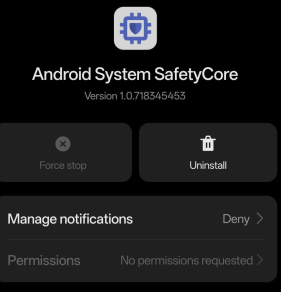
I recently heard in one of my tech groups on the Matrix network about a new app suddenly appearing on many Android devices: Android System SafetyCore. ?
At first, there was a lot of confusion – some suspected malware, others thought it was a buggy update. But it quickly became clear: this isn’t some shady download, but rather an official Google system app silently installed on devices without any visible announcement.

And that’s where the problem begins: when a company like Google rolls out background features that deeply integrate into the system, the question inevitably arises – is this really about safety, or also about control?

What does the app actually do?

SafetyCore is an invisible system service, embedded deeply within Android. It acts as infrastructure for on-device machine learning. According to Google, the app is initially being used in Google Messages – where it automatically detects images that may contain sensitive content such as nudity.

Here’s how it works:

  • If you receive an image with possible “sensitive content,” it’s first blurred.
  • A warning ? appears with information and support resources.
  • You then decide whether to view the image or block it.
  • The same applies when sending images – if nudity is detected, you’ll be warned before sending.

Google stresses that this analysis happens only on your device (on-device), and images are not uploaded to servers. Technically, SafetyCore provides the recognition modules that apps like Messages can call upon.

Planned future functions include:

  • Detecting dangerous links in chats
  • Blocking messages from unknown international senders
  • Classifying content as spam, fraud, or malware
Why I find this problematic ⚠️
  1. Installed without consent
    SafetyCore was rolled out automatically, with no prior request or notification.
  2. Lack of transparency
    Google only mentioned the app in a blog post. Most users discovered it when digging through their system app list.
  3. Potential for abuse
    Even if Google currently claims no data is sent to servers, the technical groundwork is there. This could change in the future.
  4. Undermining end-to-end encryption
    In theory, apps like SafetyCore can weaken the concept of end-to-end encryption. Why? Because content is scanned before it is encrypted and sent. The encryption remains intact, but if messages or images are analyzed on the device prior to encryption, the real protective value is compromised.
  5. Erosion of personal freedom
    My phone belongs to me. I shouldn’t be forced to accept hidden apps that inspect my content – even if they are supposedly “for my protection.”
  6. Privacy law concerns
    Under European GDPR rules, installing apps that process sensitive data without clear consent is questionable at best.
What the community says

The reactions are divided:

  • Some see SafetyCore as a useful tool to fight scams and unwanted content.
  • Others compare it to spyware, since it installs silently and integrates deep into the system.
  • Most interestingly, GrapheneOS – an alternative Android system for Google Pixel devices focused on security and privacy (see this blog post) – does not install SafetyCore at all. Its developers emphasize that SafetyCore is designed for classification tasks (spam, malware, phishing) but not for reporting illegal content. They stress that making such a distinction is crucial to protect privacy and prevent false positives.
What you can do ?️
  • Locate the app: Settings → Apps → Show all apps → Three-dot menu → Show system apps → search “SafetyCore”
  • Disable it: In many cases, you can at least disable the app or remove updates.
  • Stay alert: SafetyCore can reappear with future updates.
Conclusion ✍️

I believe security is important – but not at the cost of freedom and privacy.
SafetyCore might be well-intentioned, but its silent rollout breeds mistrust.

While systems like GrapheneOS deliberately avoid hidden installations and give users full control, Google silently installs an app that inspects your content – no matter how “local” the analysis may be.

Even more worrying is the fact that such a system can effectively weaken end-to-end encryption: if content is analyzed before encryption, the core principle of secure private communication is undermined.

Your smartphone should remain your space of self-determination – not a black box where hidden functions run without your knowledge or consent.

Categories
Blog Android Messenger OpenSource Security Server

2025-08-17: Molly – Your Privacy-Focused Alternative to Signal

As an IT consultant, I see every day how important secure and private messaging is. Signal does a great job and is rightly considered one of the most secure messengers ✅ – but Molly puts even more emphasis on privacy and control.

What’s especially interesting: On GrapheneOS, Molly is available by default, as it is recommended there as a trusted messenger. But you can also use Molly on any other Android system by simply installing the APK manually.

Why Molly?

Molly is based on the Signal protocol but adds additional security features such as encryption at rest (encrypting locally stored data).

Other advantages include:

  • Open-Source – transparent and verifiable.
  • More control – option to use your own push infrastructure.
  • Optimized for privacy – especially in combination with GrapheneOS.

For a deeper look at GrapheneOS, check this out:
GrapheneOS – More Security, Less Google: How to Make Your Smartphone Truly Private

Download the Latest Version
Please note:
Manual installation file available for free download (for advanced users)
Setup with My Molly-Socket Server

To make Molly even more privacy-friendly, you can connect it to my own Molly-Socket server:

https://molly.it-service-commander.de

Here’s how:

  1. Open the app.
  2. Go to Settings → Notifications → Push Notifications.
  3. Select “Unified Push” ? as the push service.
  4. Scan the QR code from my website.
    (https://molly.it-service-commander.de/)

This way, your push notifications don’t run through third-party servers but through your own infrastructure ?️ – a clear advantage for privacy.

Conclusion

Signal is already excellent ✅ – but Molly is the even more privacy-focused choice. On GrapheneOS, Molly comes preinstalled, and on any other Android system it can easily be installed manually.

I personally use Molly every day – not just as a messenger, but as part of a holistic privacy strategy.

Categories
Blog Security

2025-08-03: IT Security in the Rhein-Erft District – How I Protect Your Business from Cyberattacks

IT security in the Rhein-Erft district has never been more important: cyberattacks, data loss or downtime can severely damage small and medium-sized businesses. As an IT service provider in this region, I make sure your IT systems are reliably protected – so you can focus on your business.

Why IT security is crucial for companies in the Rhein-Erft district ⚠️

The threat from hackers is constantly increasing. Phishing, ransomware and social engineering are no longer limited to large corporations. Small and medium-sized enterprises in the Rhein-Erft district are increasingly becoming targets for cybercriminals.

Many companies believe they are too small to be interesting for attackers. The reality is: attackers specifically look for systems that are poorly protected.

A recent example shows how devastating the consequences can be:
The Einhaus Group from Hamm, once Germany’s leading electronics insurance provider, was attacked in March 2023 by the ransomware group “Royal.” All systems were encrypted, and a ransom of around €200,000 was paid – but the data was never released. The results: months of downtime, damages in the mid-seven-digit range, and ultimately, insolvency. This case shows that even established medium-sized companies can be existentially threatened by a single cyberattack.

How I, as an IT service provider, ensure secure systems

As an IT service provider in the Rhein-Erft district, I specialize in securing small and medium-sized companies. My approach includes:

  1. Analysis of your current systems
    I review your IT landscape, identify vulnerabilities, and assess risks.
  2. Security concept and measures
    Together we develop a tailored security concept with firewalls, antivirus solutions, encrypted connections, and backup strategies.
  3. Training for your employees
    Technology alone is not enough. I train you and your team to recognize phishing emails, manage passwords securely, and handle data responsibly.
  4. Ongoing support and monitoring
    IT security is a process. I continuously monitor your systems, apply updates, and react immediately to suspicious incidents.
Cyber Security Day Rhein-Erft

The importance of these topics is also highlighted by the annual Cyber Security Day organized by the Rhein-Erft Business Development Agency (more information here). At this event, current threats are presented and strategies for companies in the region are discussed. This year, I will also be attending in person and will have the opportunity to talk to companies about cybersecurity.

My goal: Making your company safe

I want you to be able to focus entirely on your core business – with the peace of mind that your IT systems are reliable and secure.

If you are based in the Rhein-Erft district and want to improve your IT security, feel free to contact me. Together, we will make your company more resilient to the dangers of the digital world.

Categories
Blog Android Anonymity Blackout Messenger Security

2025-08-02: BitChat – Emergency Communication in a Blackout

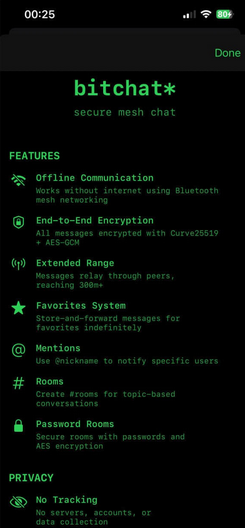
In a crisis, every message counts. When mobile networks, the internet, or centralized services go down, you still need a way to stay in touch with people nearby. BitChat, created by Jack Dorsey, was designed exactly for that: an app that works without the internet and sends messages directly from one device to another.

What is BitChat?

BitChat is a messenger that does not require any account, phone number, or Wi-Fi. The app connects via Bluetooth to other devices in the area and passes messages along – like a relay baton being handed from one person to the next. This way, you can communicate even when traditional networks fail.

Why this app is so useful in emergencies
  • Works without infrastructure: Even if the mobile network goes down, you can send encrypted messages to people within range. This can be a lifesaver during natural disasters, power outages, or in restricted areas.
  • Quick to start: No registration, no passwords. Open the app, choose a display name, and start messaging – ideal when every second matters. ⏱️✅
  • Private & secure: Messages are encrypted, there’s no central data storage, and you don’t need to share personal information. You stay anonymous and protected.
  • Emergency wipe: With a quick action, you can instantly remove all local chat data – useful if you need to erase traces quickly.
  • Extended reach through relaying: Even if two people are not directly connected, messages “hop” through other users. This increases the effective range without the internet.
Things to keep in mind ⚠️
  • Dependent on other users: For messages to be forwarded, there need to be other people nearby with the BitChat app running. In very remote areas, this can be less reliable.
  • Limited single-hop range: Bluetooth has a physical range limit; multiple hops make up for that, but movement and low user density can affect connectivity.
  • Beta / Availability: The app is still new – especially on Apple devices – and some versions may still be in an early stage.
Where to get BitChat
  • For iOS / Apple devices: Download BitChat Mesh directly from the App Store. It works with iPhone (iOS 16+), iPad, Mac (M1+), and even Apple Vision Pro.
  • For Android: The Android version is available on GitHub. You can find the latest installation file (APK) here:
    https://github.com/permissionlesstech/bitchat-android/releases
Manual installation file available for free download (for advanced users)
Conclusion

BitChat is not a replacement for your regular communication channels, but it is a valuable and robust backup tool for emergency situations. Its offline capabilities, ease of use, privacy features, and quick data-wipe option make it a tool you can rely on when normal networks fail.

Recommended steps for your emergency setup:

  • Install and test BitChat ✔️
  • Keep Bluetooth enabled ✔️
  • Set a display name ✔️
  • Try out the emergency data wipe ✔️
  • Brief your colleagues or team ✔️

More information here:
https://bitchat.free/

Categories
Blog Android Anonymity OpenSource Security Smartphone

2025-07-23: GrapheneOS: More Security, Less Google – How to Take Back Control of Your Smartphone

In a world where smartphones have become constant companions — and often know more about us than we’d like — a fair question arises:
How can I use my phone without constantly sharing data with Google and others?

One convincing answer: GrapheneOS.
An alternative Android operating system focused entirely on security, privacy, and user control. In this post, I’ll walk you through what GrapheneOS offers, its pros and cons, and how it can help you reclaim your digital freedom — without giving up too much functionality.

Learn more on the official website: https://grapheneos.org

What Is GrapheneOS?

GrapheneOS is an independent, open-source operating system based on the Android Open Source Project (AOSP), designed with one clear goal: to make smartphones more secure and privacy-respecting.

Unlike standard Android builds, it comes without any pre-installed Google services, and instead adds a wide range of security improvements at the system level — all while remaining fully compatible with Android apps.

GrapheneOS is ideal for users who are tech-savvy or deeply privacy-conscious — journalists, business owners, developers, or just private individuals who want more control.

How Does GrapheneOS Help You De-Google Your Life?

✔️ No Built-in Google Services

GrapheneOS includes no Google Play Services, no Google account requirement, and no background communication with Google servers. You’re in full control of what your device does.

✔️ Optional, Sandboxed Google Play

If you need specific apps that depend on Google services, you can install them manually in an isolated sandbox. They behave like regular third-party apps and don’t have privileged access to the system.

✔️ Fine-Grained Permission Management

GrapheneOS gives you detailed control over permissions. You can restrict access to network, sensors, camera, or microphone — even based on whether the screen is locked.

✅ Advantages of GrapheneOS

  • Top-Tier Security Architecture
    Hardened kernel, exploit mitigations, secure boot, and memory safety features like MTE.
  • Strong App Sandboxing
    Apps run in isolated environments to reduce risk and prevent cross-app interference.
  • Fast and Frequent Updates
    Security patches are rolled out promptly — often faster than official Android builds.
  • Fully Open Source and Transparent
    Every line of code is auditable. No hidden processes, no surprises.
  • ⚙️ User-Centric Design
    You decide what runs on your phone. No bloatware or forced services.
  • Minimalist, Privacy-Friendly Apps
    Includes a secure browser (Vanadium), open-source PDF reader, camera app, and verification tools.

⚠️ Possible Drawbacks

  • Limited Device Support
    Currently, GrapheneOS is officially supported only on Google Pixel devices (6 and newer). Devices from other manufacturers are not compatible.
  • Requires Some Technical Knowledge
    Installing GrapheneOS means unlocking the bootloader and flashing the system using a computer. It’s well documented, but not beginner-level.
  • App Compatibility Can Vary
    Some apps — especially in banking or streaming — depend on Google Play Services and might not work as expected (or at all) without sandboxed support.
  • Learning Curve for New Users
    If you’re used to heavily customized Android skins (like Samsung One UI) or iOS, it may take time to adjust to GrapheneOS’s minimalist and security-focused environment.
  • No Pre-Installed Extras
    GrapheneOS keeps things lean. Common apps like calendar, gallery, or email clients need to be installed manually from trusted sources.

✔️ Supported Devices (as of July 2025)

GrapheneOS officially supports the following devices:

  • Google Pixel 9 / 9 Pro / 9 Pro XL / 9 Pro Fold / 9a
  • Google Pixel 8 / 8 Pro / 8a
  • Google Pixel 7 / 7 Pro / 7a
  • Google Pixel 6 / 6a
  • Google Pixel Fold
  • Google Pixel Tablet

If you already own one of these or plan to get one — you’re ready to go.

Conclusion

GrapheneOS is a powerful operating system for anyone who takes privacy and security seriously. It combines advanced protections with compatibility for most Android apps — and it does so without tying you to Google or other third parties.

Yes, it takes a bit more effort to install and get used to. But if digital independence is important to you, the benefits clearly outweigh the challenges.

Need Help Getting Started? I’ve Got You Covered.

As an IT service provider, I offer the following:

  • Support with installing and configuring GrapheneOS on your Pixel device
  • Consultation on app compatibility and secure usage
  • Pre-configured devices with GrapheneOS – fully set up and ready to use

If you’re considering switching to a more secure and private smartphone experience, feel free to get in touch. I’d be happy to assist — whether you already own a Pixel or want to purchase one that’s ready to use.

Real digital privacy starts with taking control of your own device.
Let’s make that happen — together.